PostGraphile — The Gateway Drug To GraphQL
10 min read
Postgraphile is the quickest way to scaffold a fully functional GraphQL CRUD API for your application without touching a line of code, (well that’s a lie but let it pass for dramatic effect). This article will expose you to the basics of what GraphQL is and how can we create an api quickly with postgraphile.
Disclaimer: This article will give an overview of what these concepts are at top level. Go ahead with documentation of specific library to understand real world implemenetation details.
What is GraphQL
GraphQL is a query language(QL) just like the good old SQL. I won’t go into any bookish definition. Let’s understand it practically.
Now that the QL part is sorted, let’s give meaning to the graph word. It may chime with the feel of ERDs used in RDBMS. Okay my bad, forgot my promise of being practical. Let’s visualize the medium or any blog as a graph in the simplest possible manner.
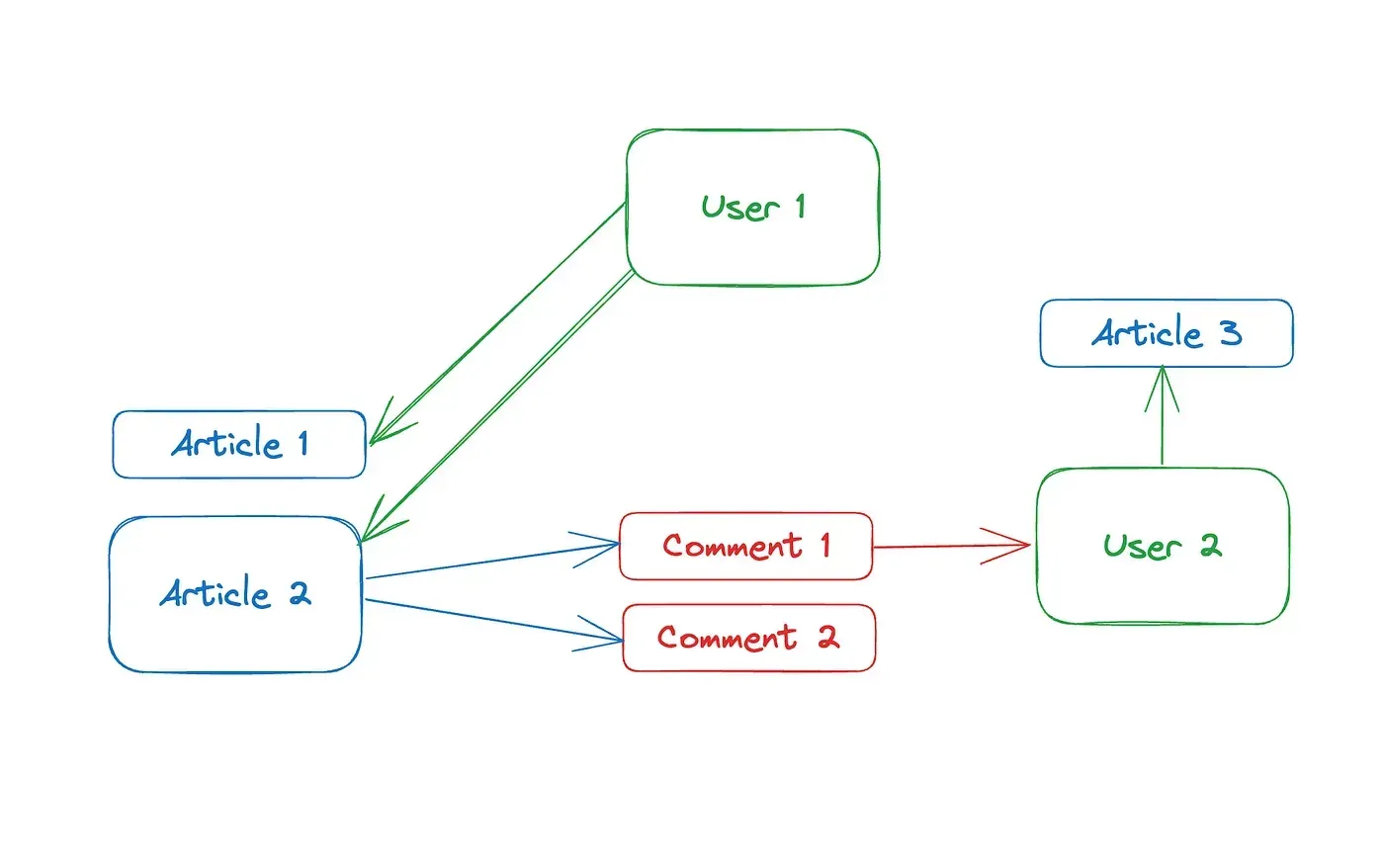 User 1 wrote 2 articles — Article 2 has 2 comments — User 2 wrote Comment 1 — User 2 also wrote Article 3
Now things appear much more visually understandable. We can see the connection that each record bears with another, without abstractly thinking in terms of tables. At this point, everything starts looking like one big graph of records.
To sum up, GraphQL is a query language to query this graph of records, just like SQL is a query language for data stored in tables.
Terminologies
- Node: An individual object present in our database.
- Edge: Relationship of the said object with others.
- Query: As the name suggests, process of getting one or more fields from the node.
- Mutation: A change operation on the node as a whole or some of its fields.
- Schema: A representation of the overall structure of the graphql system.
- Resolver: A function that tells how to get a certain field on a node.
These folks have picked up some sensible nomenclature. It seems redundant to even explain what each term means. +10 points. If you want to learn it, nothing beats the official docs. But, for the sake of completeness, let’s do a small example.
Sample code in JavaScript
import { ApolloServer } from "@apollo/server";
import { startStandaloneServer } from "@apollo/server/standalone";

const typeDefs = `#graphql
  type Book {
    title: String
    author: String
  }

  type Query {
    books: [Book]
  }
`;

const books = [
  {
    title: "The Awakening",
    author: "Kate Chopin",
  },
  {
    title: "City of Glass",
    author: "Paul Auster",
  },
];

const resolvers = {
  Query: {
    books: () => books,
  },
};

const server = new ApolloServer({
  typeDefs,
  resolvers,
});

const { url } = await startStandaloneServer(server, { listen: { port: 4000 } });

console.log(`🚀 Server listening at: ${url}`);
I know it may be overwhelming for someone new. Let’s quickly break it down a bit in some bullet points.
@apollo/serveris the GraphQL provider library, which makes the implementation and life easier. It has both a server and a client.typeDefsis used to define the structure of our data and allow queries.booksis a mock source of data, in the real application this will be some database.resolversprovide the implementation details as to how these queries will be resolved.
Output
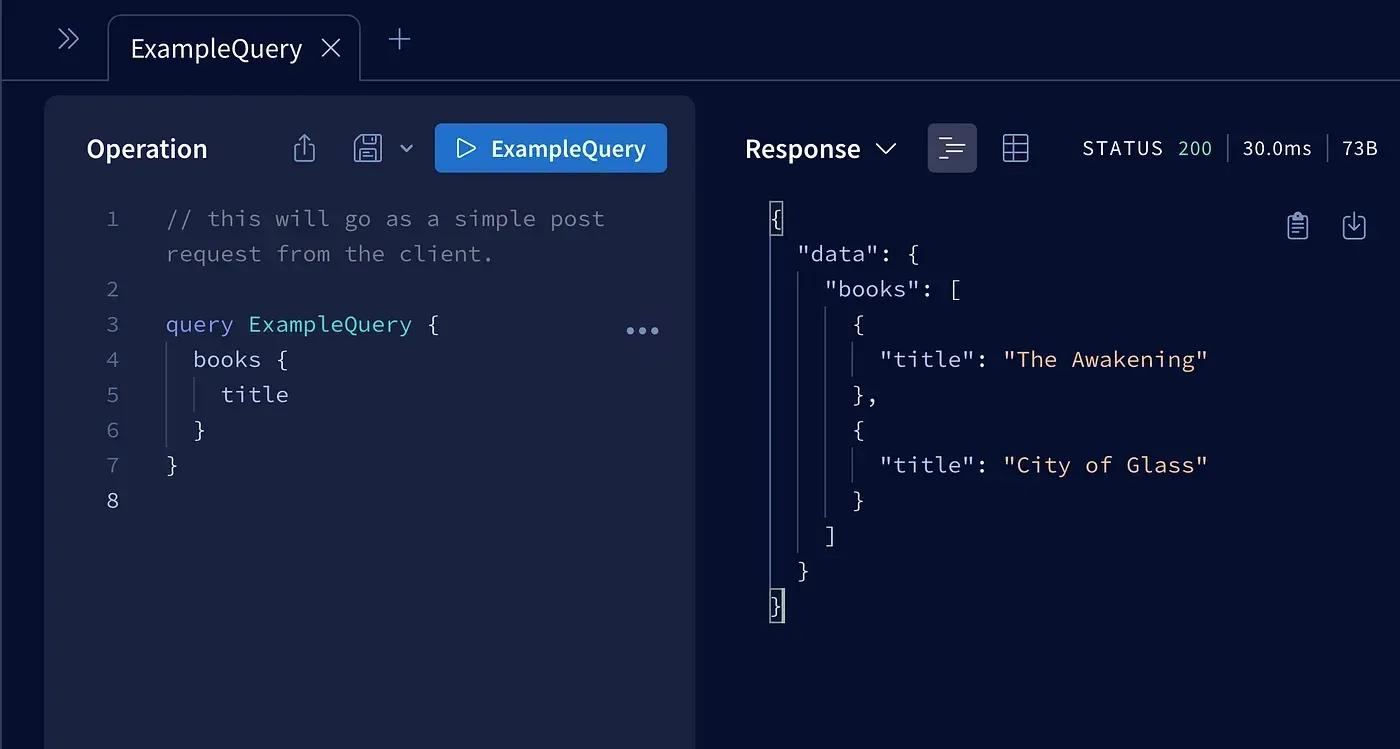 localhost:4000
I wonder if anything can be simpler. You might not have noticed that it solves one of the biggest problems with REST APIs.
With GraphQL we fetch only the specific fields that are required for our current need.
Long gone are days when API responses will contain two-thirds of useless data for work in hand. It is a game changer for large-scale applications owing to this solution for overfetching.
Apart from overfetching, underfetching is no less a problem. Imagine you want a book and its publisher’s name to show on a webpage. One query goes for the book and then the next one for publisher API. With GraphQL, it can be easily done in one shot as:
query BooksWithAuthor {
  books: {
    title,
    author,
    publisher: { name }
  }
}
So far so good. I see you vibing with the overall idea. Define how you’d like the output to be and it comes just like that without repeated queries. What can be accessed and how it will be furnished can be tightly controlled by typedefs and resolvers in the backend.
In the next section, we’ll take a few bitter pills to set the expectations right.
What isn’t GraphQL
 Not a piece of cake
Repeat after me, GraphQL is just a type of API, like REST.
GraphQL is not a:
- Standalone full-scale server
- Database paradigm or Query Language
- Business logic container
So, even with GraphQL, you’ll need a traditional SQL/no-SQL database like MySQL, Postgres, MongoDB, etc. We are just changing the way the front end calls the back end in contrast to the traditional REST API.
GraphQL is a delight for front-end developers. Nothing makes them happier than using GraphQL to fetch all the data they need in one shot. Imagine a single API call giving all the information needed to render a page completely.
Then why it isn’t spreading like wildfire in the developer circles? Well, that’s because it’s a pain for backend devs to write and manage these APIs. All that nesting becomes troublesome to write typedefs for. Nuances for connecting with every single table, handling permissions, and most of all tuning the performance.
If one is not going for traditional table joins then imagine hitting a query to get publisher details for every book that you get. It’s the infamous N+1 problem in the world of SQL and REST. Frontend becomes a little easy but the backend becomes a nightmare.
What is PostGraphile
PostGraphile Instant GraphQL API
It is a GraphQL implementation using Postgres as its database, the best database known to mankind. The good part is that it involves the least amount of manual intervention possible. Almost a no-code solution if you want to query or modify your database without any customization.
It can be used in three ways:
- Schema only — It generates the GraphQL schema by using Postgres table reflections and leaves implementation to users.
- CLI mode — It can be run using the PostGraphile CLI tool with options and a list of extensions passed inline.
- Library mode — The most versatile approach where it can be mounted as a route to existing NodeJS applications. Custom functions can be written to extend the schema obtained from the database.
For a complete overview, we will look into library mode. In its essence, PostGraphile is a middleware that sits between the Postgres database and your web API, which automatically scans and facilitates GraphQL queries and mutations. In short, it automagically creates typedefs and resolvers.
Getting started
- Scaffold an express application.
- Install PostGraphile.
npm install postgraphile - Add some quick start configs to the starting point of the app.
const express = require("express");
const { postgraphile } = require("postgraphile");

const app = express();

const postgraphileOptions = {
  watchPg: true,
  dynamicJson: true,
  setofFunctionsContainNulls: false,
  ignoreRBAC: false,
  showErrorStack: "json",
  extendedErrors: ["hint", "detail", "errcode"],
  exportGqlSchemaPath: "schema.graphql",
  graphiql: true,
  enhanceGraphiql: true,
  allowExplain(_) {
    return true;
  },
  enableQueryBatching: true,
  legacyRelations: "omit",
};

app.use(postgraphile(process.env.DATABASE_URL, "public", postgraphileOptions));

app.listen(process.env.PORT);
Apart from PostGraphile feature toggles, we need to pass the database URL as the most important parameter to PostGraphile for it to bootstrap the application.
It may appear monkey business up till here but forget not. This is all you need. It doesn’t matter if your database contains 2 or 200 tables, 10 or a million records, 10 or 10,000 users, etc.
You might have noticed we are not defining any typedefs or resolvers. Postgraphile is looking at our well-structured Postgres db and converting the table schema into a GraphQL schema.
Apart from the HTTP endpoint, we get a full-blown playground to test our queries and mutations easily. It comes up at the /graphiql route. Have a look below.
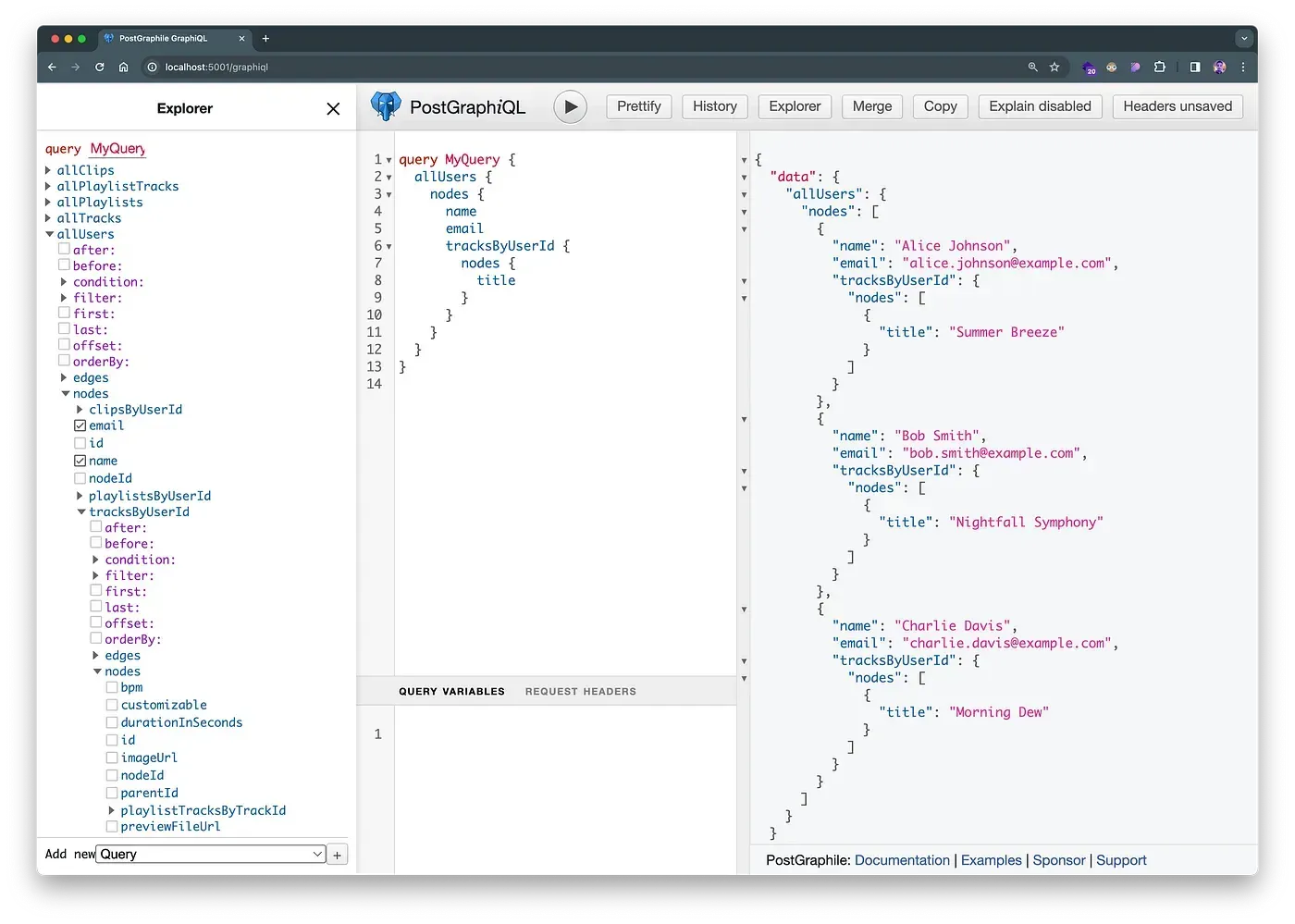 localhost:5001/graphiql
No surprise, it works just like the regular GraphQL API, and we can do that nested query, which we were amazed at. On the left, we have a full-blown explorer, which shows what our schema looks like. The center panel is for queries and mutations. The right one is for our output. Once we are confident, we can just copy the centerpiece and paste it into our front-end application.
One super important thing to notice here is that all this schema is generated by following some strict naming conventions. Notice how we used the field name tracksByUserId to get all tracks of a user where the tracks table is connected to users table using the user_id field. There are a handful of such rules that you can check on the PostGraphile website.
In the next section, we’ll go through some common things you may want to do in PostGraphile.
How to do stuff in the PostGraphile world

Preparing the database
This is going to be the old simple Postgres setup with no additional steps. Create a schema explicitly if you need access control to certain tables. Make sure to add necessary foreign keys to connect various tables. In the end, all we need is a valid database URL to feed in PostGraphile initialization. The format looks like this:
postgres://user:password@somehost:2345/somedbCreating a custom field
It’s pretty common to need a composite/computed field in your response object. The simplest example is combining the first and last name into full name. There are two ways to achieve it:
- Use database-level functions: This method is the fastest and most optimized because code lives right into the database. For this example, you just need to open the database console and run the following:
CREATE OR REPLACE FUNCTION users_fullname(users users) RETURNS text AS
$$
SELECT CONCAT(users.first_name, ' ', users.last_name)
$$ LANGUAGE sql STABLE;
Notice that it follows a certain format in naming. The name of the function will always be tableName_fieldName, allowing PostGraphile to connect it as the resolver for that specific field automatically. You can keep it as a db migration script or whatever fits your use case.
- Write resolver manually when things are more complex: We need to go this path to cleanly define custom functionalities in the PostGraphile system. For the given example of fullName, we can create it as an extension in a separate file and import it into the main file where we initialize the app.
fullname.js contains this custom resolver to extend what we already have. The name of the file is totally up to you.
const { makeExtendSchemaPlugin, gql } = require("graphile-utils");

// Create a GraphQL schema extension to add the computed full_name field
const FullNamePlugin = makeExtendSchemaPlugin({
  typeDefs: gql`
    extend type User {
      fullName: String
    }
  `,
  resolvers: {
    User: {
      fullName: (user, args, context, resolveInfo) => {
        return `${user.firstName} ${user.lastName}`;
      },
    },
  },
});

module.exports = FullNamePlugin;
Now we can import this file into our main file as:
const FullNamePlugin = require("./fullname");

const postgraphileOptions = {
  ...
  appendPlugins: [
    FullNamePlugin,
  ],
  ...
}
With just this much work, our custom field and resolver are ready to use in our application. And, it works as expected.
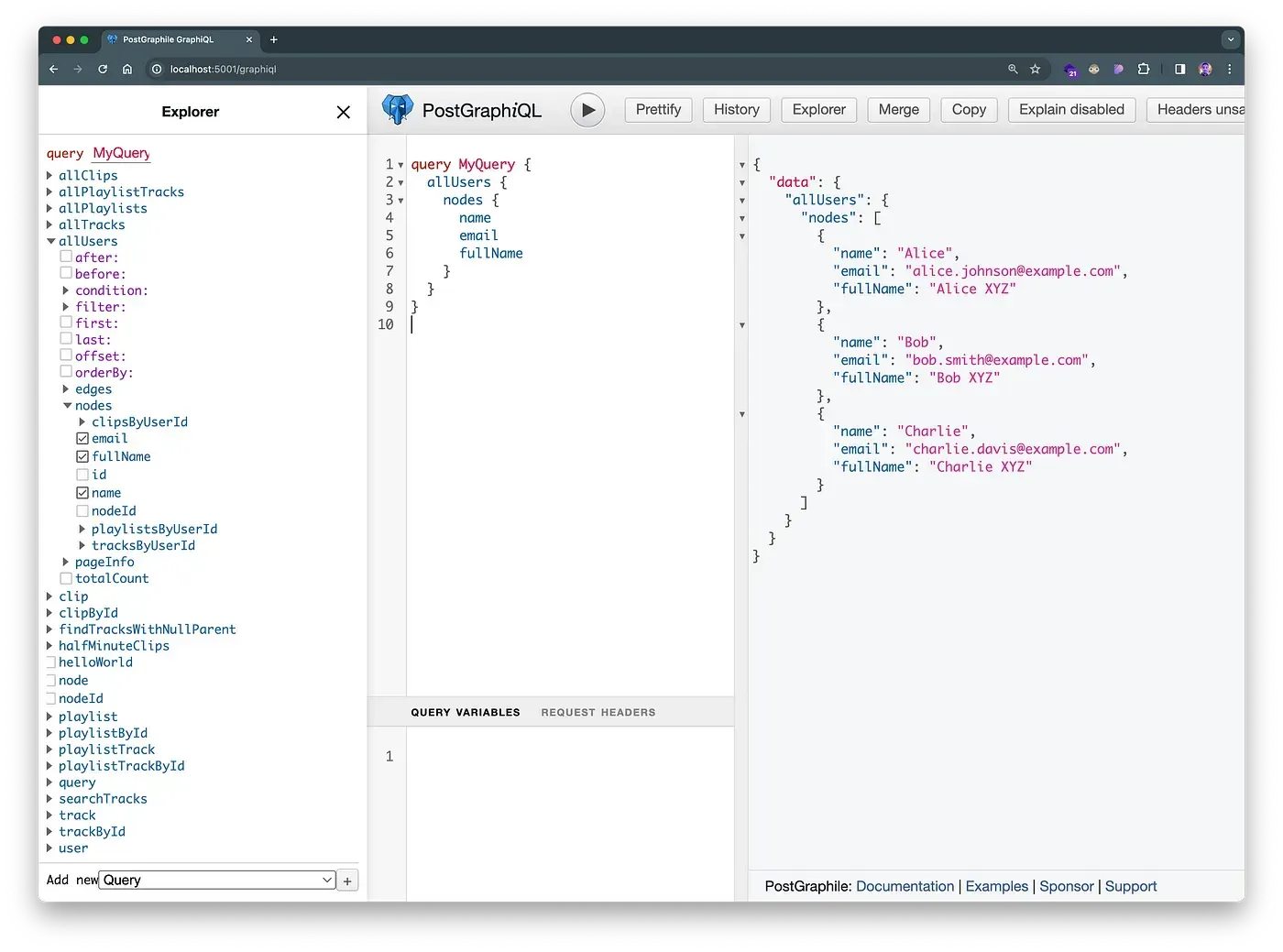 Querying custom fields in postgraphile
Adding a description to fields in GraphQL Explorer
It makes sense, and it is hardcore simple. Add a comment to the field using SQL, and it will be available in the explorer.
comment on column tracks.bpm is E'Beats per Minute...'; Auto-generated documentation for the bpm field
Control visibility/modification of fields or tables
Again magic comments are to our rescue. Postgraphile can be instructed to exclude any field or table from GraphQL access by using smart tags such as:
// users table is marked as read only
comment on table users is E'@omit create, update, delete';

// version field from tracks table is completely removed from graphql
comment on column tracks.version is E'@omit read';
Access control to records

Since it is so deeply tied to Postgres, it makes full use of Postgres roles and schemas for security. Postgraphile comes with a built-in implementation of JWT and can be used to fine-tune access further. A simple authorization looks like:
GRANT SELECT ON users TO app_users;
GRANT DELETE ON users TO app_admins;
Also, row-level security features can be used to finely restrict people from accessing a certain row in the table.
create policy user_policy_select
on public.users for select to users
USING (
email = current_setting('current_user_email')
);
ALTER TABLE users ENABLE ROW LEVEL SECURITY;
Filtering records

Filtering is supported natively to a certain extent, and it can be enhanced with full relational operator support using a connection filter plugin. Sample syntax:
query getOneUser {
  user(id: 1) {
    id
    email
    name
  }
}One good thing to know is that postgraphile behind the scenes optimizes your query conversion from GQL to SQL. The result is one single top-level query, thus eliminating the N+1 problem we discussed earlier.
You can go on with postgraphile documentation to continue your exploration further.
Cons of PostGraphile

Once again, same question: if everything is so awesome, why isn’t everyone using this as a defacto way of building applications?
The answer was evident from the start. PostGraphile takes away a lot of control from the user for its magic to happen. From big technical details to simple things, such as how one should name his fields, are dictated by PostGraphile. Engineers don’t like this, and they seriously don’t.
Apart from technical things, the community is pretty small. So, if you are stuck somewhere, the lord may have mercy.
Being so close to db creates a big abstraction for developers. Making change is tough because things are living right in the database. And, also switching the db is not much of an option.
Regardless, I like the simplicity it brings to the table. We can use this solution for small websites like personal blogs, portfolios, hobby projects, etc. It seems a solid contender for even big websites that are frontend-heavy and don’t have much going in the backend apart from simple crud.
Conclusion

It’s been a bumpy ride, ain’t it? GraphQL is an interesting piece of technology and can be useful in certain scenarios, such as:
- You don’t know the access pattern of the consumer apps.
- Your tables are huge, and in most cases, people only need a small subset of fields.
- Performance issues need to be solved by reducing response payload size and network roundtrips.
But be aware implementing those types and resolvers will suck life out of you as the application starts getting complex. PostGraphile’s approach is clap-worthy but a little idealist. Nonetheless, if someone is starting with GraphQL, postgraphile serves as a magical option to use your existing database and get a feel of how things will look in the GraphQL world without investing time and effort in an elaborate setup.